


If you’re aiming for local RP on a 24GB VRAM GPU like the RTX 3090 or the RTX 4090, 24B models are usually where the text generation starts feeling properly consistent, with better scene flow, stronger character adherence, and less random derailment than most smaller 7-8B picks. Here is a quick no-nonsense list of the best 24B fine-tunes and merges available in GGUF quantizations that you can use with your favorite local LLM inference software like KoboldCpp with SillyTavern, or the OobaBooga Text Generation WebUI.
You might also like: My 7 Best 7B Models For OobaBooga – AI Roleplay & Chatting
My Quick Top Picks
- Cydonia-24B: safe all-round go-to model pick for most RP styles, very popular community choice in recent months.
- Dolphin-Mistral-24B Venice Edition: new easily steerable uncensored 24B version of the Dolphin model family mentioned in my 7B models list.
- Maginum-Cydoms-24B: quality model merge built from multiple strong 24B ingredients.
- Goetia-24B: an even more liberal uncensored merge, also interesting to look at.
What Kind Of Models Will Work Well on a 24GB VRAM Card?
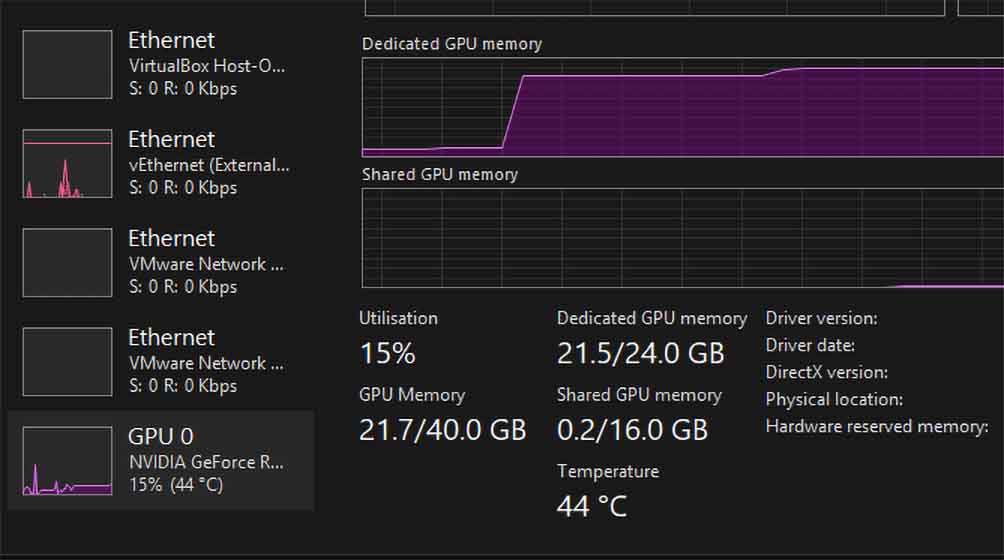
On a 24GB card, you want models that are (1) actually tuned for creative dialogue and character adherence (RP fine-tunes or proven RP merges), (2) available in a format you can run reliably (most commonly GGUF, as you will see below), and (3) have a known chat template so you don’t have to troubleshoot formatting inconsistencies in your inference software for long hours (many/most models already come with their own chat templates embedded).
Once you’ve picked an RP-tuned 24B model, the next constraint on a 24GB card is simple: you need the model weights to fit in VRAM with enough leftover space for runtime overhead and whatever context length you plan to use.
How To Get The Right GGUF Quantization
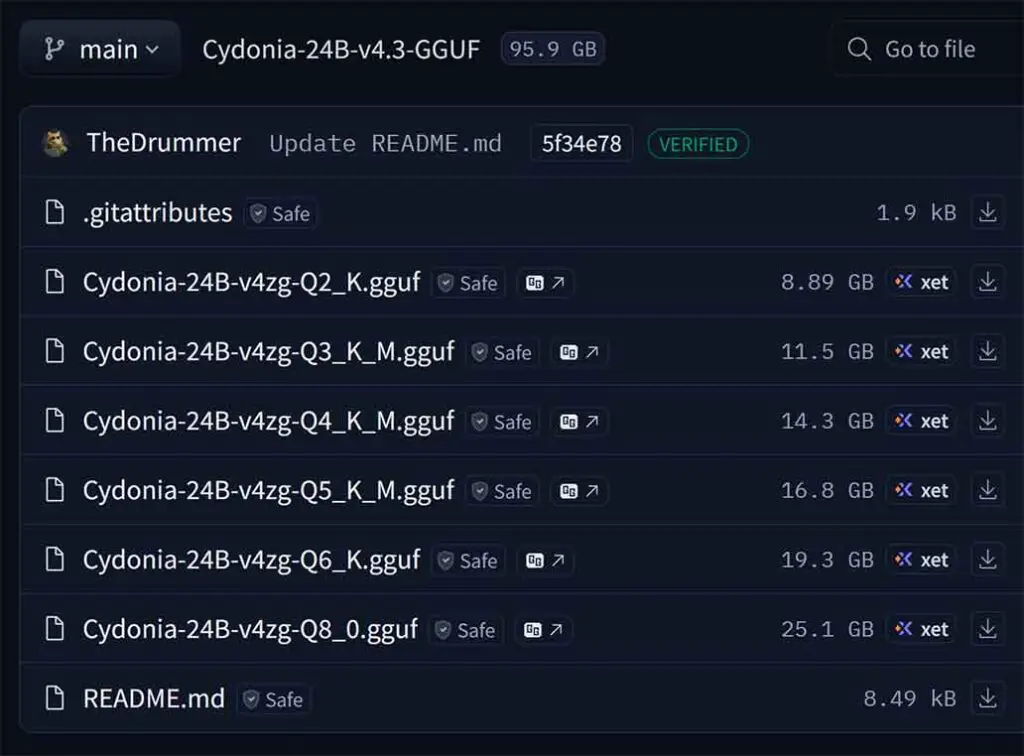
When you open a model on Hugging Face, the main page is often not where you can directly download the GGUF file you need for your GPU. These primary repositories usually feature sharded .safetensors files, which won’t be of much use to you if you are using a GGUF/llama.cpp-style backend like KoboldCpp.
Below, you will find links to both the main model repositories and the specific repositories containing the GGUF quantizations I tested. However, you should read this section first to understand how to choose the right file.
To use the models mentioned below on your 24GB GPU, you don’t want to download the full model versions from their main repositories – these will be too large to fit in your GPU VRAM, and would work extremely slowly.
Instead, you need to download a so-called “quantization” of the model available in the GGUF file format (smaller size, slightly lower quality, better VRAM footprint). These quantizations are most often made either by the model creators, or other local LLM community members.
To get to the file downloads you need from the main model page, scroll to the “Model tree” section, and use the “Quantizations” branch to jump to a list of repositories containing the actual quantized versions of the model you’d like to download. On this list, it’s usually best to search for the most recent repositories with the highest download counts.
How To Choose The Right .gguf File (Quant Names Explained)
Upon opening your chosen GGUF repository, click the “Files and versions” tab, and download the file ending in .gguf that matches your target quant. How to know which one to pick? Filenames like this: Q6_K / Q5_K_M / Q4_K_M denote the llama.cpp “K-quants” (modern GGUF quants); the first number is the bit precision class (higher = larger + higher quality), and the suffix _S/_M/_L is small/medium/large variants of the same quant family (for RP, _M is usually the sane default when present).
For a 24GB GPU running 24B models, start with Q6_K if you want maximum quality and you are fine with a moderate context window (in many cases these will weigh around 19-20 GB); pick Q5_K_M if you want more VRAM headroom for longer chats/lorebooks (KV cache) with only a small quality hit; drop to Q4_K_M only if you are pushing a very long context or need extra margin.
Avoid Q8_0 on 24GB for 24B models because the weights alone are often around 25GB, making them unable to fully fit on your GPU (you will hit OOM or spill over to RAM crushing your inference speed).
Note that many repositories will also offer IQ variants, with a naming scheme similar to the one mentioned above.
Always remember: you need some memory headroom for your KV cache, the more of it, the longer your planned character/assistant conversations are. If you want to learn more about how all this works in simple terms, check out this quick guide here: LLMs & Their Size In VRAM Explained – Quantizations, Context, KV-Cache
Best 24B LLMs For 24GB VRAM Local RP
Everything below is linked directly to the model cards / quant packs so you can check the author’s template notes, file lists, and updates.
1. Cydonia-24B (v4.3)
Cydonia-24B by TheDrummer is in my eyes one of the most consistent 24B “daily drivers” for local RP right now. It gives you strong narration, good scene continuity, and it tends to keep characters distinct even in group model chats. The model card explicitly lists its compatible template as Mistral v7 Tekken. The GGUF quants also prepared by the model author are available here.
2. Magidonia-24B (v4.3)
Magidonia-24B, also coming from TheDrummer, is essentially another “flavor” of the base Cydonia model. The differences in outputs are there, however in my experience the style of both models is very similar. Much like Cydonia, it’s recommended to be used alongside the Mistral v7 Tekken template. You can find all of the model quants in this repository here.
3. Dolphin-Mistral-24B Venice Edition
Dolphin-Mistral-24B-Venice-Edition is an uncensored 24B Mistral-based model made in collaboration with Venice.ai, positioned as a general-purpose model you can steer heavily via your own system prompt and rules. The model utilizes the default Mistral chat template. It’s one of the safer, less strongly styled options for a great out-of-the-box experience, easy to push toward your own narratives. For GGUF format, you can check out this quant set prepared by bartowski.
4. Maginum-Cydoms-24B
Maginum-Cydoms-24B is a merge designed to blend multiple well-performing popular 24B ingredients (including Cydonia, Magidonia, original Mistral Small, and a few different models). It gives you another updated output flavor that is in a way still reasonably similar to the main checkpoints made by TheDrummer. You can find the GGUF quantizations of this model by mradermacher here.
5. Goetia-24B (v1.3, and the older v1.2)
Goetia-24B-v1.3 by Naphula (alongside the older but still very much popular Goetia-24B-v1.2) is one of the worthwhile uncensored models appropriate for the darker or more dramatic/edgy RP scenarios. It’s a huge merge of a nearly two dozen different models that can grant you very good results when it comes to storytelling, and it rarely ever refuses to answer. It makes use of a Mistral Tekken chat template. You can either make use of the official Q6_K quant made by Naphula, or find more options prepared on seeingterra’s profile.
6. Pantheon-RP-24B
Pantheon-RP-1.8-24b-Small-3.1 by Gryphe is one of the older yet still relevant “purpose-built” RP options in this size class. It’s trained on multiple RP categories such as personas, general character cards, text-adventure style outputs, etc. The trained Pantheon personas listed in the model repository are another neat way to RP with the model using those baked-in personalities that you can activate with different system prompt presets. It’s a great model that still holds up in many local RP scenarios, making use of the base ChatML template. All relevant quants are available here, the courtesy of BasedAGI.
Bonus: Assistant_Pepe_8B
Assistant_Pepe_8B by Sicarius, while it’s not a 24B model, is what I thought would be a fun mention here. As you can probably guess by its name, this uncensored model is quite an interesting mix between the unfiltered from a certain website with a green clover in its logo, and a genuinely helpful instruct-style model with a theoretical maximum context window of 1 million tokens (hardware-dependent). While it might not be a perfect pick for RP without some prompt and template modifications, it’s surprisingly good at putting together coherent and creative narratives without any filter. It makes use of the Llama-3-Instruct template. All GGUF quants are also provided by Sicarius here.
And that’s pretty much it! If you’re still shopping for hardware, see Best GPUs For AI Training & Inference (and the high-VRAM overview: Best High VRAM GPU Options). For the full VRAM/quant/context explanation, read LLMs & Their Size In VRAM Explained.
You might also be interested in: Character.ai Offline & Without Filter? – Free And Local Alternatives