


The choice between these two will in most cases be the matter of choosing between the larger amount of VRAM, more tensor cores and wider memory bus on the now discontinued RTX 4090, and the slightly higher base clock speed, lower power draw, newer platform features, and lower price on the more recent RTX 5080. Choosing one over the other for local AI software use will largely depend on your particular workflows, and will also be different when it comes to multi-GPU setups. I recently prepared this in-depth analysis while considering a GPU upgrade for my own main rig. Enjoy!
This web portal is reader-supported, and is a part of the AliExpress Partner Program, Amazon Services LLC Associates Program and the eBay Partner Network. When you buy using links on our site, we may earn an affiliate commission!
Reference Table – Specs & Availability

NVIDIA RTX 5080
Newer Blackwell architecture, 16GB of GDDR7 VRAM, and lower power consumption.

NVIDIA RTX 4090
The previous generation’s flagship, 24GB of GDDR6X VRAM, better raw compute performance.
| Specification | GeForce RTX 5080 | GeForce RTX 4090 |
|---|---|---|
| GPU Architecture | Blackwell (GB203) | Ada Lovelace (AD102) |
| Boost Clock | 2.6GHz | 2.5GHz |
| VRAM | 16GB GDDR7 | 24GB GDDR6X |
| Memory Bus | 256-bit | 384-bit |
| Memory Bandwidth | ~960 GB/s | ~1008 GB/s |
| CUDA Cores | 10,752 | 16,384 |
| Tensor Cores | 336, 5th Gen | 512, 4th Gen |
| Ray-Tracing Cores | 84, 4th Gen | 128, 3rd Gen |
| TDP (Power Draw) | 360W | 450W |
| DLSS Support | DLSS 4 | DLSS 3 |
GeForce RTX 5080
For:
- Newer hardware, Blackwell architecture.
- Lower power consumption.
- New features like DLSS 4 and FP4/FP6 support.
- Faster GDDR7 memory.
Against:
- Less VRAM (16GB), a major limit for large local AI models.
- Fewer CUDA & tensor cores and lower raw compute performance.
GeForce RTX 4090
For:
- 24GB of VRAM on board.
- Better in terms of raw performance in most contexts.
- The top card from the previous, 4th generation.
Against:
- Very high power draw (450W TDP).
- Lacks support for newer DLSS 4 features.
Quick & Straight To The Point – If You Don’t Need More Details:
- The RTX 4090 has 24GB of VRAM on board, and the 5080 only features 16GB of video memory – this makes the 4090 almost always a better choice for memory intensive tasks, like running large LLMs locally, especially when it comes to multi-GPU setups.
- While the RTX 5080 has faster GDDR7 memory, the 4090 has a wider memory bus. This makes the two cards pretty much equal when it comes to their memory bandwidth (both are around 1 TB/s), which in the end, doesn’t make any real difference between them in terms of memory speed.
- The newer RTX 5080 supports DLSS 4, and the 4090 stops at DLSS 3. This however, would only matter to you, if you prioritize minor improvements in gaming performance (usually up to ~10-20% on the 5080 in relation to the 4090 in games that make use of the DLSS upscaling and frame generation capabilities).
- The general floating-point operations performance is much higher on the 4090 than on the 5080 (~82 TFLOPS vs ~58 TFLOPS in most benchmarks).
- In the majority of cases, the RTX 4090 is the better choice for most memory-heavy local AI workflows, and is the more versatile pick because of its higher VRAM capacity. It is also one of a few high-VRAM consumer GPUs from NVIDIA (with the RTX 3090 24GB and the 5090 32GB as the other two examples), as of the time of writing this comparison.
Hardware Differences & VRAM Capacity
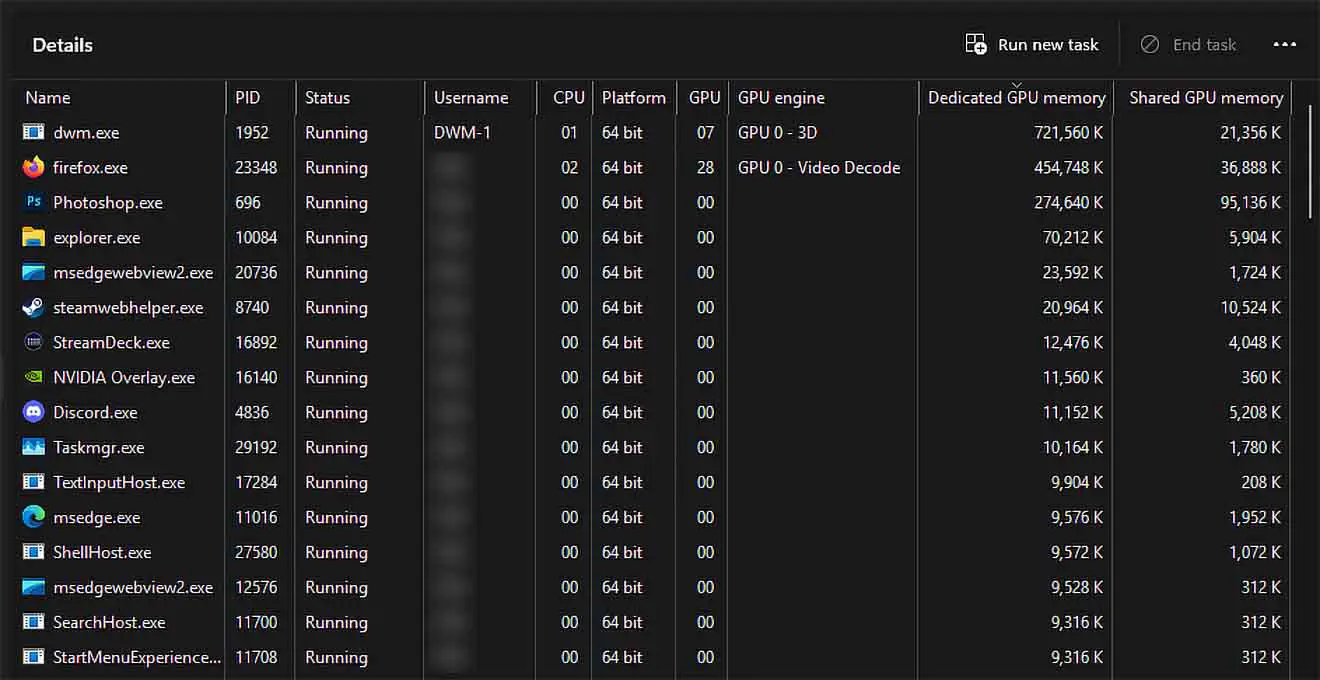
The main, and most important difference between the RTX 5080 and the RTX 4090 when it comes to local AI workflows is the amount of video memory (VRAM) they have to offer.
RTX 5080, the newer card from the two, has 16GB of GDDR7 VRAM, with a 256-bit memory bus granting a memory bandwidth of around 1 TB/s.
The RTX 4090, being the older one, features 24GB of GDDR6X VRAM, with a 384-bit memory bus, with the very much similar memory bandwidth of about 1 TB/s.
The same scores when it comes to the max bandwidth comes from the difference between the memory type used on both cards (GDDR6X vs. GDDR7).
So, in short: if you care about for instance, loading large LLM files onto your GPU for inference, and the memory is one of your biggest constraints when it comes to your planned workflows, the RTX 4090 will always be a better choice from the two. If you care more about getting your card brand new, and don’t need as much space for models at runtime anytime in the future, the RTX 5080 can still pose a great value.
Beyond the VRAM capacity, the Blackwell architecture in the RTX 5080 introduces 5th-generation Tensor Cores (although it has less of them on board). These cores add native support for FP4 and FP6 precision operations, which can in many contexts be used for even more efficient AI training and inference.
While the RTX 4090’s 4th-gen cores are exceptionally powerful for FP16 and FP8, they cannot leverage these newer, tighter quantizations which can potentially double throughput on supported models. According to NVIDIA’s official spec sheet, the 5080 offers approximately 1,801 AI TOPS (INT8), actually surpassing the 4090’s 1,321 TOPS in their AI throughput test scenarios despite having fewer CUDA cores in total. Still, at least in my book, the promotional benchmark results from the NVIDIA website should always be taken with a grain of salt.
However, this speed advantage is strictly theoretical if the model cannot fit into the 5080’s 16GB buffer. Once you exceed VRAM capacity and spill over to system RAM (offloading), inference speed drops by orders of magnitude, rendering the 5080’s faster compute irrelevant for larger unquantized models.
If you’re not sure why you need large amounts of VRAM for locally hosted LLMs, you can find the answer here: LLMs & Their Size In VRAM Explained – Quantizations, Context, KV-Cache
“You can run big models or long prompts on a consumer GPU (8–16 GB VRAM) — but rarely both.”
https://medium.com/@lyx_62906/context-kills-vram-how-to-run-llms-on-consumer-gpus-a785e8035632
Real-World Performance – Most Relevant Benchmarks & Practical Tests
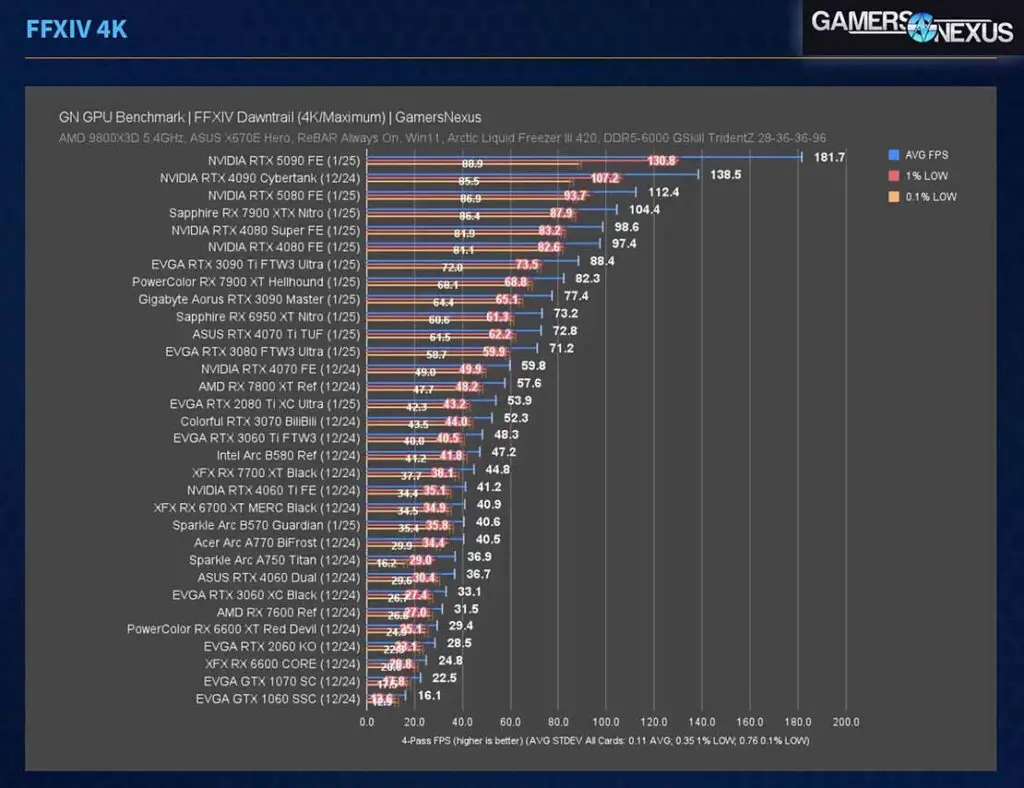
The benchmark performance scores for the RTX 4090 and the RTX 5080 are surprisingly close.
As showcased in the GamersNexus benchmarks the cards do present very similar performance in most gaming-related scenarios in 1080p, 2k and 4k resolutions (including with ray tracing enabled), with the 4090 taking the lead in many scenarios relying on its higher raw compute power. In practical gaming tests, such as this video comparison done by Mark PC, you can also see that the average FPS scores are largely close to equal in most games across different resolutions.
When it comes to frame generation and image upscaling, the 4090 has support for DLSS 3, the newer 5080 supports DLSS 4 which introduces multi-frame generation capabilities. Essentially, if you care for upped game performance and resolution in supported titles with a higher display latency and artificially generated frames, the 5080 is able to use the updated version of the DLSS tech.
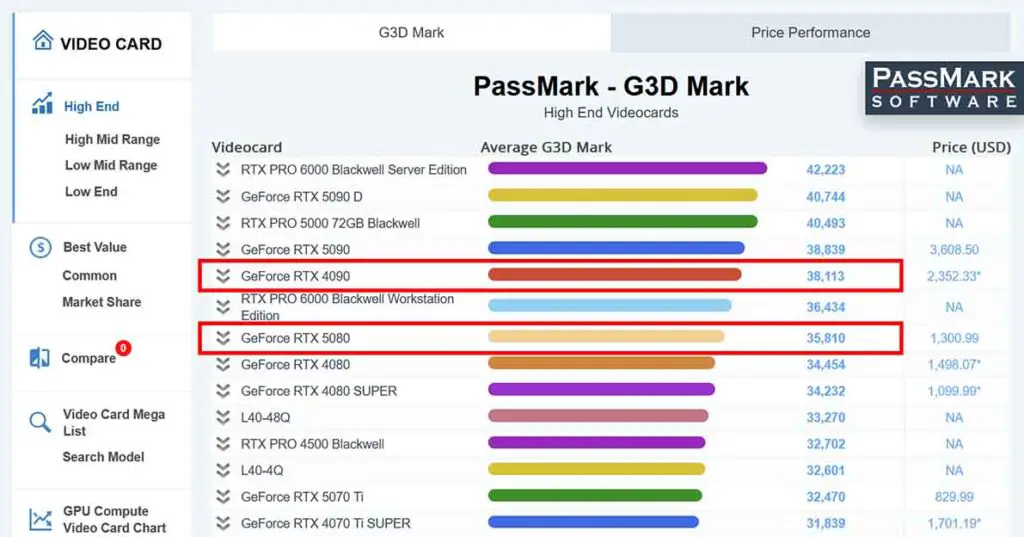
In PassMark, both cards sit close together in the front of the top-10 GPU list in the high-end GPUs G3D Mark test, achieving scores of approximately 36k points for the 5080, and 38k points for the 4090 which always has a slight upper hand here.
The 4090, in many tests online surprisingly seems to be very close to the much newer RTX 5090 when it comes to benchmark performance.
Perhaps one of the best comparisons between the two was made by DigitalTrends, and you can find it right here. In it, the RTX 5080 falls short of dethroning the RTX 4090 in raw performance, delivering roughly 70-80% of its speed in rasterization and ray tracing benchmarks across games like Cyberpunk 2077 and Alan Wake 2, while consuming less power and benefiting from newer Blackwell architecture features like improved DLSS 4 support. This closely corresponds with the other benchmarks found online, including the ones mentioned above.
The 4090 retains advantages in 4K gaming with its higher VRAM (24GB vs. 16GB) and peak throughput, which pretty much makes it preferable for demanding workloads despite higher cost and older design. The 5080 might be a more value-oriented upgrade for most users over the previous generations, but is by no means a direct replacement for the 4090.
Local AI Image Generation Software & Video Generation
Basic local image generation workflows, unlike local large language models, usually do not require much video memory if you’re not using secondary models in your work, or utilize refiners switching between various different models very often.
This however, can easily change once you are set on utilizing non-Stable Diffusion models like FLUX, or virtually any larger video generation models like Wan, HunyuanVideo, or LTX. In that case, you will greatly benefit from the larger amount of VRAM on your system, and in many cases having insufficient memory can prevent you from generating longer or larger resolution videos altogether.
How much do you need then? Once again, that will depend on the models you’ll decide to use. Despite that, a quick rule of thumb can be: for basic image generation using SD & SDXL models, as little as 6-8 GB of VRAM can easily suffice. However, when it comes to FLUX family models, as well as using multiple models in the same workflow, 16 GB of VRAM would be the minimum recommended amount.
Video generation on the other hand, can eat up as much VRAM as you give it, mainly because the longer of a video you want to generate, and the higher its resolution, the more operational memory you need on your GPU.
This is why, while for both basic and advanced image generation workflows the RTX 5080 will be more than enough, when we’re talking about local AI video generation, the RTX 4090 is the one you should be going for.
Available Image Generation Benchmarks


In terms of AI image generation performance, both of these cards go head-to-head. In the Chimolog benchmarks (original site in Japanese), which are among the most well put together ones you can find for GPUs used for SD & SDXL image generation, the 4090 and 5080 go head-to-head in most timing rankings, however the 4090 always has a slight upper hand when it comes to image generation speed.

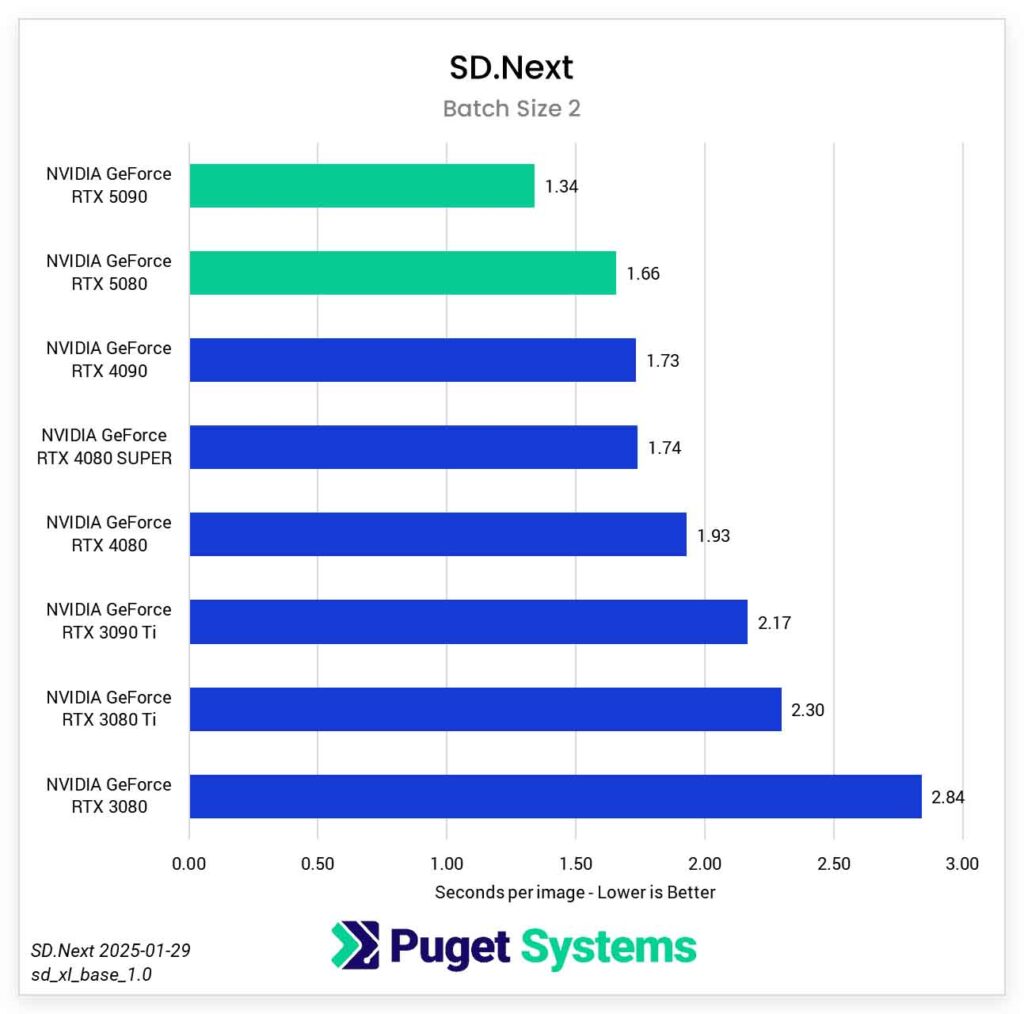
The PugetSystems tests done using the SD.Next software on the other hand, signify the 5080 having that slight edge over the 4090 in the tested image generation workflows, but once again, these are very small differences, coming close to 2-4 it/s, or 0.20 seconds per one generated image. As you can see, there is little to no point comparing these two when it comes to image generation speed alone.
In the Vladmandic A1111 extension crowd-sourced Stable Diffusion GPU performance data, the RTX 5080 gets top scores of around 22-30 it/s with 512×512 images, while the 4090 is often seen reaching speeds up to 30-50 it/s in some reports. Keep in mind that at the time of writing this article, Vladmandic doesn’t have many records of 5080’s in its database, so this data isn’t really representative of the broader spectrum of A1111 users.
Large Language Models Inference

Local AI text generation via open-source LLM inference is a task that is first and foremost VRAM-heavy. This is because the entire model weights and the KV Cache (the “memory” of your current conversation) must reside in the VRAM to achieve acceptable tokens-per-second (t/s) speeds, as you can further read in this guide here.
In local inference benchmarks, the RTX 4090 is the clear winner, simply because of its larger VRAM capacity. To give you some examples:
- RTX 4090 (24GB VRAM): Can comfortably run 30B–34B parameter models (e.g. Yi-34B, Command R) at 4-bit quantization with usable context lengths and strong inference speeds, without needing system-RAM offloading in most setups.
- RTX 5080 (16GB VRAM): Is best suited for ~7B–13B models at reasonable quality settings. Larger models (20B–34B) are only practical when heavily quantized or compressed, often with shorter context lengths or partial CPU offloading, which can significantly reduce performance.
In this context, the 16GB capacity acts as a hard “wall.” If a model requires 18GB to run, the 5080 will offload to system RAM, causing performance to crater from ~50 t/s to ~2-3 t/s, as per usual.

When it comes to evaluating not only the VRAM capacity, but also the actual local LLM inference performance via available benchmarks, the RTX 5080 was rather accurately tested by Chris Hoffman over at Microcenter. As you can see above, these benchmark tests with various size Q4 LLMs in LM Studio have shown that the 5080 is able to achieve speeds of anywhere between ~10 to ~188 t/s depending on the model size, with the average speeds of most 20-30B Q4 models loaded being very close to what you’d expect from a usable local chat client.
Other benchmarks, like the ones conducted by PugetSystems in AI software contexts including the RTX 4090 and the RTX 5080, have shown other interesting data. In their tests with local LLM inference using llama.cpp and MLPerf, although the llama tests have shown the 5080 being much less efficient in prompt pre-processing, it went head-to-head with the 4090 when it comes to the text generation speed. In llama.cpp tests the 4090 got the score of 245 t/s, and the 5080 finished with a score of 232 t/s. In MLPerf tests, the 4090 ended the test with 176 t/s, and the 5080, with 161 t/s.
The llama.cpp benchmark was based on the Phi-3-mini-4k-instruct-q4 base model, and the MLPerf benchmark, on llama-2.7b-chat-dml.
Local audio generation, both voice (Whisper/Piper, with software like AllTalkTTS) as well as local music generation software like ACE-Step, are generally less hardware-intensive processes. These workloads will typically fit well within 16GB of VRAM, with a lot of headroom.
To Sum It All Up…
With all that said, the choice between the RTX 5080 and the RTX 4090 really boils down to one key question: is 16GB of VRAM enough for your particular local AI tasks? If your work involves running higher quality, larger open-source LLMs or local AI video generation, the answer will probably be “no”. In that case, the 24GB of VRAM on the RTX 4090 can be a huge advantage. If you don’t care that much about the video memory, both of these cards will give you great performance both when it comes to gaming and non memory-intensive AI-related tasks. Then, the choice will boil down to their current prices.
I also wouldn’t be myself if I didn’t quickly mention the RTX 3090 here, even though it’s not directly involved in our comparison. The 3090 and the 3090 Ti are, for a very good reason, still perceived as the go-to relatively budget-friendly performance monster for local AI workflows.
With 24GB of VRAM and a wide 384-bit memory bus which allows for high memory bandwidth of up to 936.2 GB/s and still very reasonable benchmark scores in comparison to more modern cards, it’s a very good card to take as a baseline when it comes to our local AI needs. Especially when we look at the current prices of a used 3090, for instance here, over on eBay.
You might also like: NVIDIA GeForce 3090/Ti For AI Software – Still Worth It?