

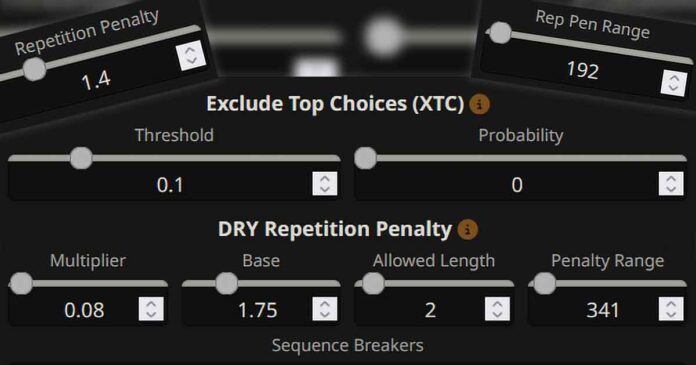
If your local LLM chats start looping, repeating the same tokens, sentences, or even whole replies, in KoboldCpp + SillyTavern (and with most other backends used with ST) the cause is usually either prompt formatting/context or your sampler settings. There are a few possible fixes here: matching your templates to the model, configuring stopping strings correctly, keeping your context clean, and utilizing anti-repetition samplers like DRY and XTC. Here is how it works.
You might also like: Quickest SillyTavern x KoboldCpp Starter Guide (Local AI Characters RP)
The Two Main Reasons Local LLMs in SillyTavern Repeat
Repetition usually comes from one (or both) of these:
- Prompt / context problems (the model keeps seeing the same patterns in your conversation):
- Wrong chat/instruct template for the model makes it “echo” roles, headers, or repeat speaker tags.
- Your chat history has duplicated instructions, long strings of unneeded data (data only loosely related to your chat), or conflicting system prompts.
- You’re pushing context beyond what the model can handle (especially with aggressive RoPE scaling), so it degrades into loops.
- Sampling problems (your chosen decoding settings make loops much more likely):
- Overly restrictive sampling (e.g., low temperature + low top-p/top-k, or high Min-P) makes the model fall into high-probability ruts.
- Misused repetition controls (too high range, too high penalty) can break grammar by preventing the model from using basic often repeating words/tokens like “a”, “the”, etc., and ironically increase looping because of the model quickly running out of “safe” tokens to use. SillyTavern explicitly warns that a high repetition penalty range can break responses by penalizing common words.
An important note before we get into the setting tweaks: These setting tweaks should work with most backends you decide to use SillyTavern with. If you’re using the KoboldCpp x SillyTavern combo, as we are doing here in this guide, remember that all the sampler settings you tweak on the SillyTavern side, will affect your outputs as intended. However, if for some reason you’d decide to adjust Sampler settings in your KoboldCpp WebUI instead, these tweaks will only affect your KoboldCpp chats, and won’t carry over to SillyTavern. Do all of the setting changes on the SillyTavern frontend side.
KoboldCpp + SillyTavern Setup That Helps to Prevent Token Repetition – Step-by-step:
1. Connect the right way (Text Completion vs Chat Completions)
- If you connect SillyTavern to KoboldCpp as a Text Completion source, most sampling controls (repetition penalty, range, etc.) should behave as expected.
- If you connect through an OpenAI-compatible Chat Completions endpoint, some sliders may map differently depending on the backend you use. This guide is based on the Text Completion source with the KoboldCpp backend.
2. Fix the template mismatch (most common cause of repeating headers / roles)
In the “AI Response Formatting” menu:
- Enable template derivation (by pressing the small lightning icon next to the “Context Template” and “Instruct Template” section headers) so that the model’s recommended template can be selected automatically based on metadata matching.
- If derivation doesn’t work, manually choose the right preset for your model family (Llama 3 / Mistral / Gemma / etc.). A wrong template can make the model repeatedly restate the system prompt, role tags, or “User/Assistant” blocks. If you don’t know what model family your model or merge belongs to, in most cases you can easily check it online.
3. Add custom stopping strings (prevents the model from writing out both sides of the conversation)
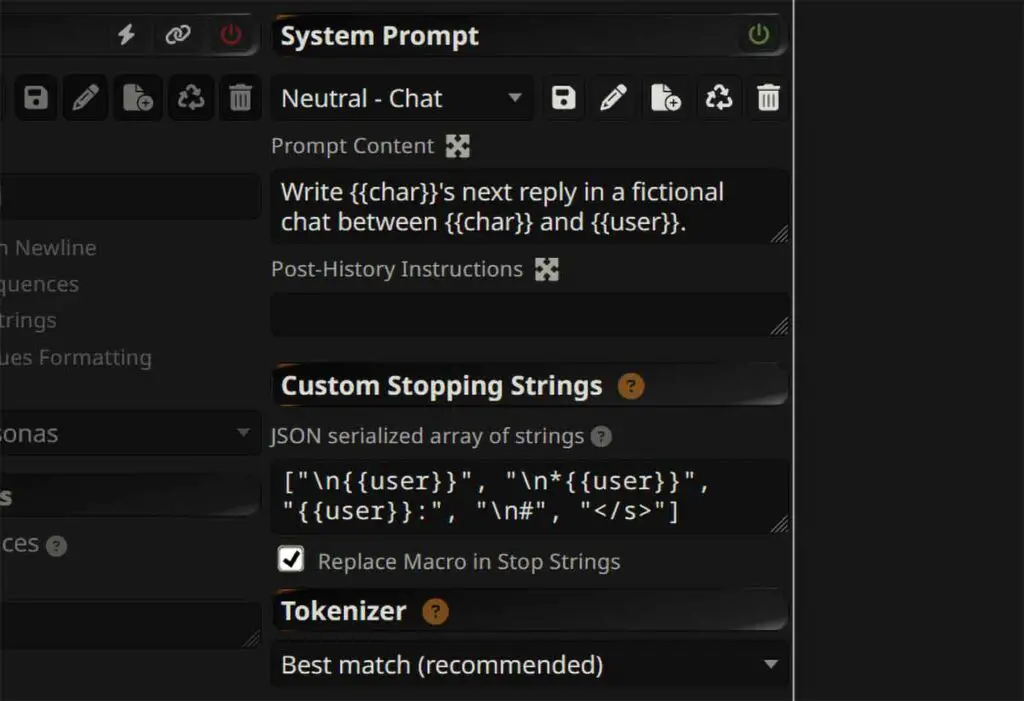
In “AI Response Formatting” menu (the one with the “A” icon), set a JSON array with custom stopping strings – that is, pieces of text on which the model will stop its reply. Examples:
- If your chat uses
User:andAssistant::["\nUser:", "\nAssistant:"]
- If you RP with character labels:
["\nUser:", "\n{{char}}:"](use the exact strings your template emits – you can see them on the left side of this settings menu)
Note: When adding custom stopping strings with {{X}} placeholder macros, make sure that the “Replace Macro in Custom Stopping Strings” box is checked.
If the stopping string will be generated at the end of the reply, it will be automatically removed, and the model reply will be forced to end.
4. Tune the repetition penalty settings correctly
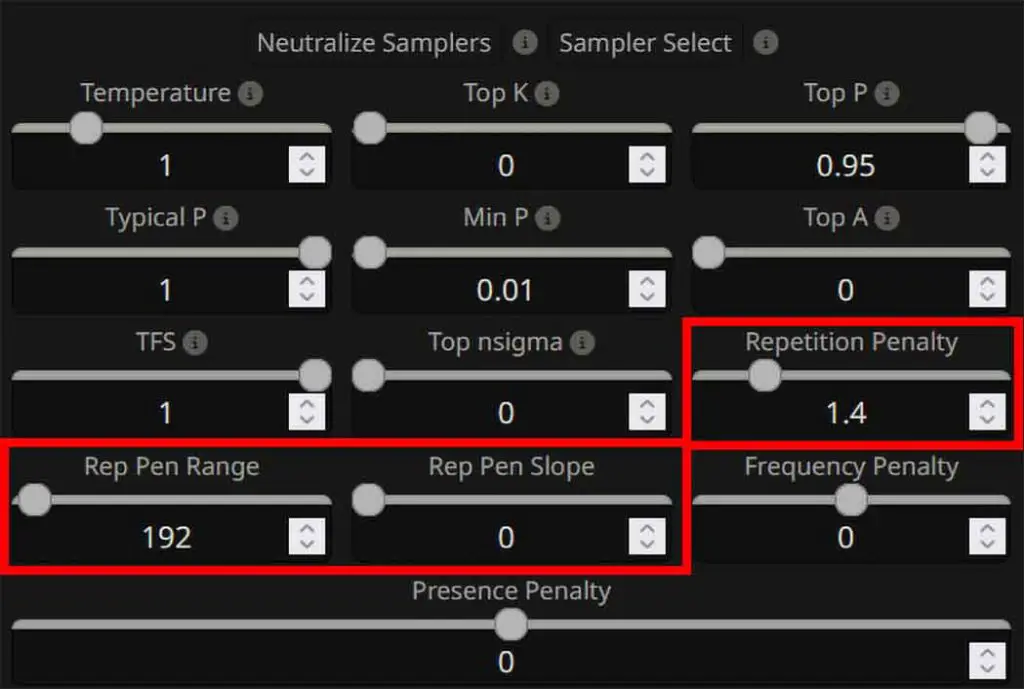
In SillyTavern “AI Response Configuration” menu (the very first one from the left on the top bar) you can tweak the Repetition Penalty settings:
- Repetition Penalty: A good baseline (per KoboldCpp’s suggested defaults) is Repetition Penalty ~1.1, which is rather gentle. You can raise it to higher values like 1.2-1.4 to increase its effect. Remember that the value of 1.0 will leave the repetition penalty feature disabled.
- Repetition Penalty Range: It defines how many previous tokens the AI “looks back” at to apply its repetition penalties. Start with values somewhere between ~200-350 (and if you need to, you can try pushing it higher). Setting the range too high can break responses by penalizing common words like “a”, “the”, “and”, and so on.
- Repetition Penalty Slope: Increases the effect of repetition penalty toward the end of the prompt. Keep at 1 initially, and only add slope if you have specific use for it with your particular model.
5. Use Min-P
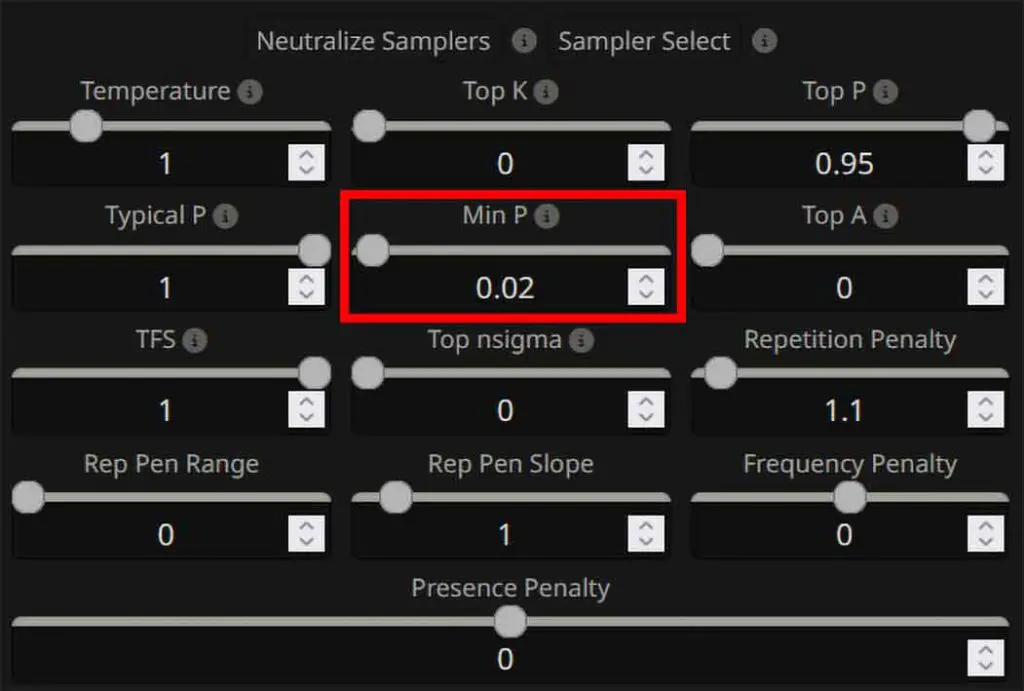
The Min-P is an alternative to the regular Top-P parameter, and it filters out low-probability tokens by only keeping those that meet a minimum percentage of the top choice token probability. If set too high however, it can actually worsen the model’s repetition problems.
- Start with Min-P = 0.02–0.08 for most chat/RP-related scenarios. A value of 0 will disable its effect.
- If you see looping after lowering randomness, reduce Min-P first before touching everything else.
6. Enable the DRY sampler
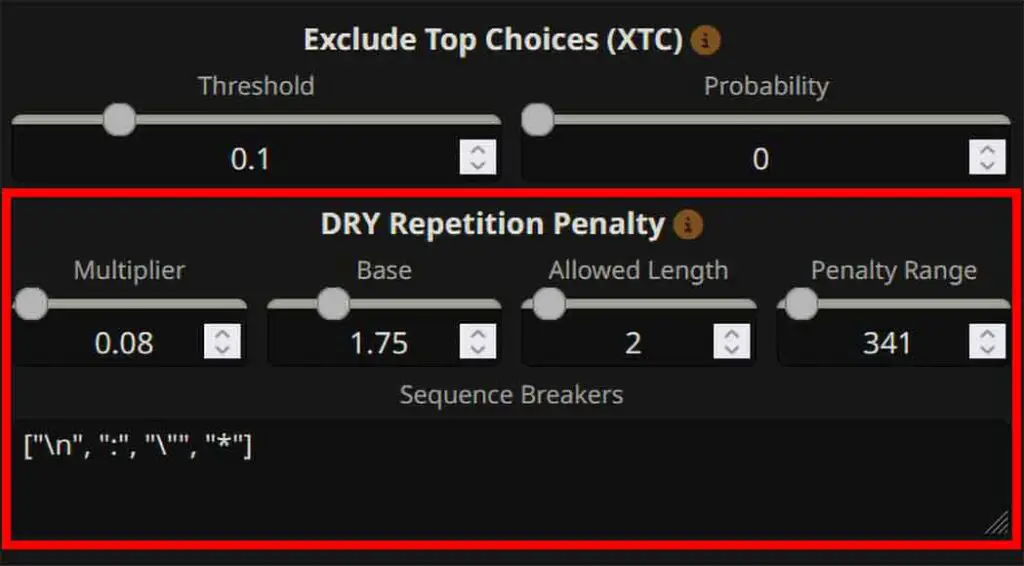
DRY (Do-Not-Repeat-Yourself) is an amazing feature added quite recently to SillyTavern and to KoboldCpp, designed as an advanced multi-token anti-repetition method. It can be used either as a complement, or full replacement for regular repetition penalty.
DRY works by penalizing tokens that would continue a sequence identical to one already present in the context, using an exponential penalty calculated from the match length and specific multipliers. This can prevent your model from repeating phrases and giving you “copy-pasted” lines. The multiplier “0” will disable the DRY feature.
Default settings recommended by the developer of DRY are as follows:
- Multiplier / dry_multiplier: 0.8 (controls the magnitude of the penalty – SillyTavern sets it to 0 by default, disabling the feature)
- Base / dry_base: 1.75 (similar to the Repetition Penalty Slope, the DRY Base setting controls how fast the penalty grows with the sequence length)
- Allowed Length / dry_allowed_length: 2 (max sequence length in tokens that can be repeated without being penalized)
- Penalty Range / dry_penalty_last_n: Defines how many previous tokens are checked when applying DRY. In llama.cpp, -1 uses the full context, 0 disables DRY, and positive values limit checking to the last N tokens.
- Sequence Breakers / dry_sequence_breakers: specific words or phrases that “reset” the DRY sampler’s repetition tracking [“\n”, “:”, “\””, “*”].
When to enable DRY:
- You get “paragraph deja vu” (the model re-says the same idea in different words).
- You get hard loops with the very same or similar text content in your chats (even after multiple message regenerations).
7. Try out the XTC sampler too
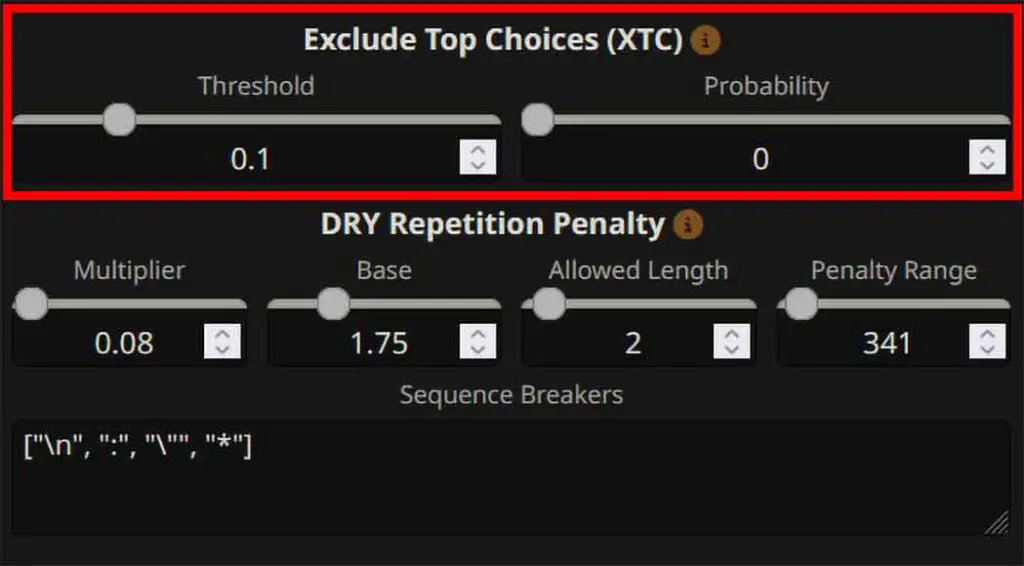
XTC (Exclude Top Choices) made by the very same person who developed DRY, drops ultra-obvious top tokens when there are many available choices, helping the model avoid falling back into the same phrasing.
KoboldCpp’s wiki includes suggested starting values (e.g., threshold ~0.15, probability ~0.5). Setting the probability to “0” will disable the XTC sampler altogether.
8. Don’t change the sampler order
The KoboldCpp wiki contains an explicit warning against changing sampler order from its default, as it can produce very poor outputs. If you imported a “creative” preset and repetition suddenly got worse, revert to defaults and re-apply only the changes you need.
Prompt-side Fixes That Actually Reduce Repetition
Use an “Author’s Note” to Enforce More Creative Outputs
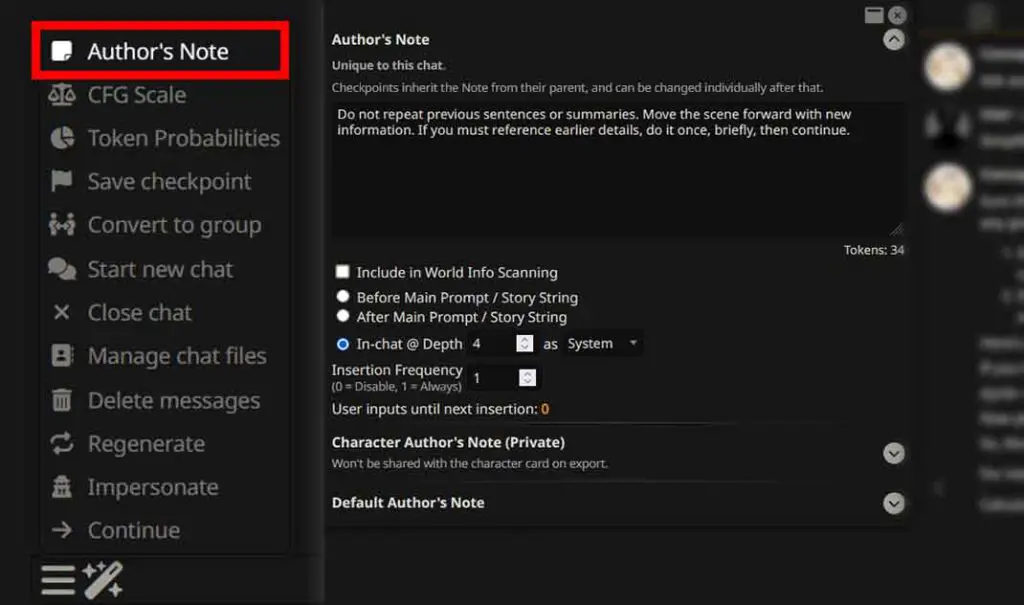
The Author’s Note functionality in SillyTavern works similarly to the system prompt, but instead of giving the initial data context to the model only once at the very beginning, it quietly inserts a block into the prompt at a chosen position/frequency and has stronger effect the closer it is to the end of context.
The depth number signifies how far up from the latest message the note will be inserted, the frequency, how often (once every X user input messages) it should happen. You can use this feature to reinforce a custom “anti-repetition policy” that the model will be reminded about each time the Author’s Note is applied.
Here is an example simple, short and effective Author’s Note:
"Do not repeat previous sentences or summaries. Move the scene forward with new information. If you must reference earlier details, do it once, briefly, then continue."Of course, you can write any prompt that encourages creative and non-repetitive output and use this feature to silently inject it into your conversations.
Set insertion frequency to every message while debugging, and then reassess your chat message outputs.
Keep Your System Prompts Short and Non-Duplicative
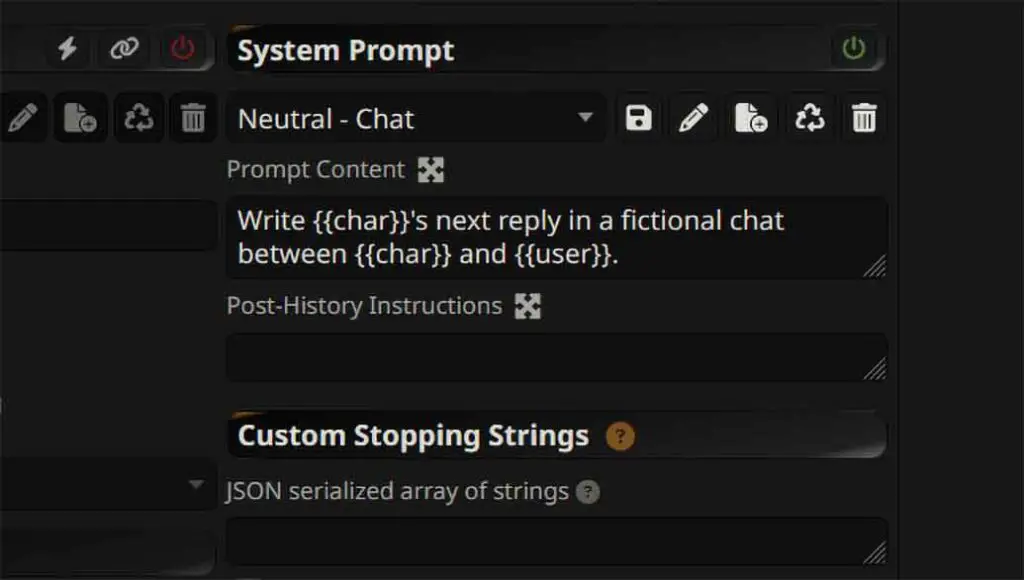
If you didn’t modify, or use a custom System Prompt or Author’s note, this section won’t really apply to your case, unless you’re using a character preset with a lot of redundant conversation line examples/data.
A very common repetition trigger is using the same or a very similar in-prompt instructions appearing in the System Prompt, Character Card, and the Author’s Note. The model, seeing the repetitive information there in-context, can easily “learn” that repeating meta-instructions is part of the output style.
Refrain from reiterating on the very same concepts in slightly different words, and from repeating similarly structured sentences anywhere in the context you give to the model before beginning your chat. This is especially important if you’re using smaller, highly quantized models.
Keep an Eye on Your Conversation & Repetitions in Chat History
This one is very important. Every time you ignore subsequent messages that repeat a substantial amount of text data in their contents and carry on with your conversation, leaving them hanging in your conversation history, the model, by the principle of in-context learning, gets its context filled with repetitions that will affect all of the following messages in your conversation, even if you tweak appropriate sampler settings along the way.
The more repetitive content you have in your conversation (like repeating phrases, sentences, or word groups), the more likely the model is to repeat itself in the following dialogue. If you notice repeated content, either edit it out of the chat history or reset the conversation before re-testing your sampler changes
Diagnose the Repetition Type (And Apply the Right Fix)
Not all repetition looks the same, and different loop patterns usually have different causes. Different kinds of repeating content and textual loops can have different underlying causes. Here are some examples of different repetition scenarios alongside the fixes you can try and incorporate if you encounter a similar situation.
A) “The model repeats “User:” / “Assistant:” blocks or writes both sides”
- Add stopping strings for your speaker separators (see above).
- Confirm the template matches the model (select the “Derive from Model Metadata” setting in the “AI Response Formatting” menu, or select correct template matching your model yourself).
B) “The model repeats the same sentence with tiny variations”
- Enable XTC/DRY (or both) with default recommended settings. Further tweak until you find the right combination for your model.
- Lower “Min-P” to ~0.01–0.05 if you have changed it before from the default value (high Min-P can worsen repetition).
- Keep “Repetition Penalty” to reasonable values (above 1.1 and below 2.0 is enough in most cases, higher values can again, make certain tokens repeat more).
C) “The chat gets stuck on one token/word (hard loops)”
- Enable XTC/DRY, or both of them with the default recommended settings, increase temperature slightly. Tweak until you find the right combination for your model.
- Reduce max output for that generation by lowering the “Response (tokens)” setting, and regenerate.
D) “The conversation gets worse ~10-30+ messages into the chat”
- Reduce context clutter: remove repeated “Author’s Notes” if you notice them directly affecting the exact wording of the late messages in your conversation, summarize your chat history (consider using the “Summarize” extension available in SillyTavern by default), and avoid stacking multiple long system instructions with repetitive content. Also, make sure that your previous messages in the conversation don’t contain excessively repetitive phrases or sentences.
- If you’re running stretched context (for instance via RoPE, set either in SillyTavern or in the backend you’re using), consider lowering the max context value to the one natively supported by your model, or using a model actually trained for longer context (this is a common cause for “late-chat degeneration”).
You might also be interested in: SillyTavern “Failed to start server” & “Node command (…)” Errors – Quick Fixes